Sounds: Animal and instrument sounds for toddlers in gugiboard
Looking for animal and instrument sounds for toddlers? Sounds offers a specific way to explore with a touchscreen, rather than a list of lessons to finish. gugiboard is a smart multi-touch busy board for touchscreens that educates and entertains the little ones in a fun way. This illustrated guide describes the real activity and simple ways to share it.
What happens in Sounds
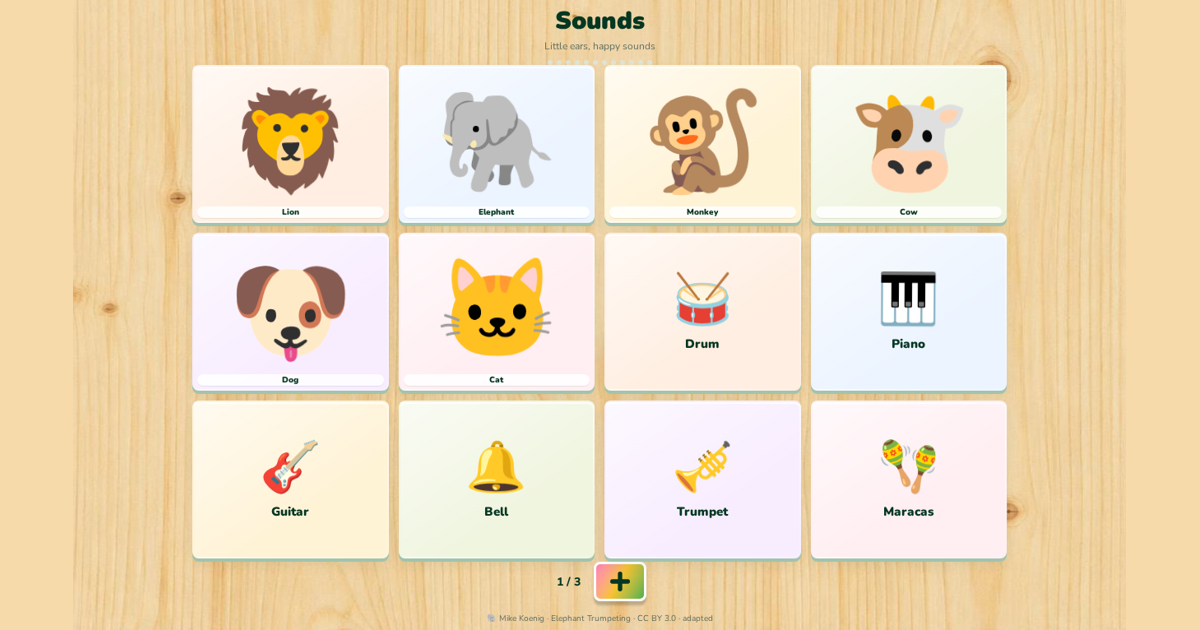
This board plays recognizable recordings of animals and instruments instead of pronouncing the selected target’s name. The first sheet includes lion, elephant, dog, cat, drum, piano, guitar, bell, trumpet and maracas. Additional sheets add more recordings and familiar everyday sounds.
Listen once, pause, then decide together whether to replay. Comparing a bell with a drum can prompt words such as ringing and tapping, without expecting a correct identification. Jungle Animals is the separate board for animal names. Use a comfortable volume and stop a sound immediately if it feels startling.
A small shared play session
Start from Home, choose the board carousel and select Sounds, and show one action slowly. Keep the device stable, wait for a response and let pointing or watching count as participation. You can return to Home at any moment. Repeating a favorite is welcome; there is no score to chase or requirement to complete the activity.
English and Spanish around the same discovery
Sounds / Sonidos is available within gugiboard’s English–Spanish play experience. The EN/ES switch changes labels and available spoken words while preserving a familiar activity. Choose Luna, Mia, Leo or Nico for prepared vocabulary recordings. Sounds uses animal and instrument recordings instead of spoken target names. Use your usual family language first, then add a short phrase in the other language if it feels natural. The activity does not promise bilingual fluency.
What completion and saved choices mean
A board tracks its supported visible targets, not everything a child has looked at. Little favorites lets an adult review accumulated board taps and optionally hide or restore targets without deleting history. Hidden percentages describe availability, not learning. Completing a sheet leads to a celebration and then the next extra sheet or activity. Navigation cancels the transition, and families can stop without finishing. Saved settings and the last play location depend on storage being available on the same device.
Continue the idea away from the screen
Listen to birds from a safe window or gently tap a child-safe drum with an adult. Never use loud household appliances as a listening exercise.
Keep screen play brief, optional and shared. gugiboard is designed for ages 0–7, but that range is not a screen-time recommendation. WHO advises no sedentary screen time at age one and at most one hour at age two; less is better. Make room for sleep, movement, books and real conversation. These suggestions are play invitations, not developmental tests or promises of faster learning.
Source and privacy
More play ideas
- Toddler browser games: a caregiver’s guide to shared play
- Colors and shapes for toddlers: simple ways to play together
- English and Spanish animal play: words, sounds and movement
- Play that moves on by itself: auto-advance and idle friends
- Little favorites in gugiboard: hidden percentages and fresh discoveries
- A visual tour of gugiboard: boards, Baby Games and Little favorites
- First words with jungle animals: lion, elephant, monkey and friends
- Alphabet play in two languages: from A for Apple to Ñ
- Happy, sad, surprised: naming feelings with toddlers
- Eyes, nose, hands: body parts games for toddlers
- Kindness through play: rescue stories for little helpers
- Cause and effect: why busy boards fascinate babies
- Music and sounds for babies: instruments, animals and soft songs
- Wake up to bedtime: teaching daily routines with Tiny House
- Tap, drag, draw: little fingers and fine motor play
- Healthy screen habits for toddlers: short, shared and balanced
- Play ideas by age: how gugiboard grows with your child from 0 to 7
- Counting with stars: first numbers through play
- Red, blue, yellow: learning colors step by step
- Circles, stars and hearts: finding shapes all around us
- Raising bilingual children at home: simple daily habits
- Sensory play for babies: lights, sounds and gentle movement
- gugiboard for children aged 4 to 7: from play to early learning
- “Great job!”: celebrating effort, not just results
- Calm moments: helping little ones through big feelings
- Meet the gugiboard chameleon: friendly characters that invite play
- From an animal picture to a story: reading picture books together
- Your turn, my turn: sharing play without a race
- Inside, outside, above and below: discovering spatial words
- Red, blue, red: noticing patterns without worksheets
- Where shall we go? Pretend journeys with vehicles and stories
- “What do you notice?” Questions that leave room for curiosity
- One last turn: helping children move from play to the next activity
- Different ways to join in: adapting shared play to your child
- Big sibling, little sibling: playing together without comparing scores
- A little garden story: noticing plants and practising care
- Zip & Clothes in gugiboard: familiar fasteners, clear little actions
- Little Workshop: what moves, opens and changes in gugiboard
- Inside Tiny House: everyday objects you can explore in gugiboard
- Circus & Sky and Circus Surprise: two playful worlds in gugiboard
- Light Factory in gugiboard: a light chain and a traffic-light scene
- Ball Adventure: big, small, slow and fast in gugiboard
- Domino Parade in gugiboard: one touch, a moving chain and bells
- What the colorful + opens in gugiboard: more content, familiar play
- Fruits & Food in gugiboard: pictures, words and everyday connections
- Rain, a clock and a doorbell: everyday sounds in gugiboard
- Little favorites: understand your child’s taps without turning play into a test
- Hide everything already tapped: a fresh set of choices, with one reversible action
- Small changes in Little favorites: one category at a time
- Hidden percentages in Little favorites: a clearer picture of available choices
- Why gugiboard moves to the next board after a completed activity
- The colorful plus: new discoveries inside a familiar gugiboard activity
- Saved favorites and the last play screen: continuity on the same device
- English–Spanish play with Little favorites: familiar interests, new words
- Moving friends and celebrations: the rhythm of a dynamic gugiboard session
- Little favorites and auto-advance: a practical routine for shared toddler play
- Jungle Animals: Animal learning games for toddlers in gugiboard
- Colors: Color learning activities for toddlers in gugiboard
- Shapes: Shape learning games for toddlers in gugiboard
- Numbers: Counting games for toddlers in gugiboard
- Alphabet: English Spanish alphabet activities in gugiboard
- Vehicles: Vehicle learning games for toddlers in gugiboard
- Body Parts: Body parts activities for toddlers in gugiboard
- Fruits & Food: Fruit and food vocabulary for children in gugiboard
- Emotions: Feelings activities for toddlers in gugiboard
- Little Workshop: Interactive busy board mechanisms in gugiboard
- Zip & Clothes: Zipper and clothes busy board in gugiboard
- Tiny House: Daily routine busy board for toddlers in gugiboard
- Circus Surprise: Circus cause and effect games in gugiboard
- Circus & Sky: Movement and weather activities for children in gugiboard
- Light Factory: Light chain cause and effect activity in gugiboard
- Ball Adventure: Rolling ball cause and effect game in gugiboard
- Domino Parade: Domino chain reaction game for children in gugiboard
- Colored Light Bulbs: Interactive colored lights busy board in gugiboard
- Spinning Things: Spinning toys cause and effect board in gugiboard
- Open & Opposite: Opposites learning busy board in gugiboard
- Pop the Bubbles: Bubble popping game for toddlers in gugiboard
- Feed the Animal: Animal feeding game for toddlers in gugiboard
- Match the Colors: Color matching game for toddlers in gugiboard
- Tap the Animals: Tap animal game for toddlers in gugiboard
- Put the Balls in the Basket: Drag and drop ball game for toddlers in gugiboard
- Turn On the Lights: Turn on lights toddler game in gugiboard
- Shape into Hole: Shape matching puzzle for toddlers in gugiboard
- Water the Flowers: Watering plant game for toddlers in gugiboard
- Find the Hidden Star: Hidden star discovery game for toddlers in gugiboard
- Make the Car Go: Simple car game for toddlers in gugiboard
- Fire Truck Rescue: Fire truck rescue game for children in gugiboard
- Save the Drowning Dog: Kind animal rescue game for children in gugiboard
- Help the Little Bird: Bird and nest rescue game for toddlers in gugiboard
- Engaging Toddler Learning Games for 2 Year Olds at Home
- Free Busy Board Games for Toddlers Online: A Simple Way to Learn
- Engaging Bilingual Toddler Activities: Master English and Spanish Early
- The Best Educational Games for 3 Year Olds: No Download Required
- Fun Toddler Color Learning Games and Activities for Home
- Interactive Shape Recognition Games for Preschoolers and Toddlers
- Fun and Interactive Counting Games for Toddlers 1 to 5
- Interactive Alphabet Games for Toddlers with Sounds: A Parent's Guide
- The Best Animal Sounds Games for Babies and Toddlers: Fun and Discovery
- Best Virtual Vehicle Games for Toddlers Who Love Cars and Trucks
- Fun Body Parts Learning Games for Babies and Toddlers
- Using Interactive Healthy Food Games for Picky Toddlers
- Fun Emotions and Feelings Games for Preschoolers
- Engaging Fine Motor Skills Activities for Toddlers: From Touch to Screen
- Mastering the Zip: Fun Ways to Practice Dressing Skills for Kids
- Daily Routine Games for Toddlers: From Morning to Bedtime
- Under the Big Top: Fun Circus Themed Games and Activities for Kids
- The Joy of Discovery: Cause and Effect Games for Babies and Toddlers
- The Joy of Domino Chain Reactions: Cause and Effect Play for Toddlers
- Exploring Light and Color: Sensory Play for Toddlers
- Why Babies Love Spinning Toys: A Guide to Visual Tracking
- Fun Open and Close Activities for Toddler Hands: From Playroom to Screen
- Teaching First Words in Spanish and English to Your Toddler
- Screen Time Tips for Toddlers: The Power of Shared Play
- How to Choose Safe Toddler Apps Without Ads: A Parent’s Guide
- Toddler Games That Work Offline: Stress-Free Travel Tips
- The Best Car Ride and Travel Games for Toddlers and Babies
- Screen-Friendly Quiet Time Activities for Toddlers Before Nap
- Engaging Rainy Day Indoor Activities for Toddlers and Preschoolers
- Screen-Safe Toddler Birthday Party Busy Board Ideas
- The Grandparent's Guide to Meaningful Online Play with Toddlers
- Shared Screen Success: Sibling Play Ideas for One Device
- Potty Training Patience: Games to Build Waiting Skills
- Maximizing Toddler Learning with Short, Engaging Play Sessions
- The Joy of Music and Sound Exploration for Babies and Toddlers
- Lullabies and Calm Music for a Better Baby Sleep Routine
- Bilingual Parenting: Practical Tips for Raising Kids with Two Languages
- Spanish Learning Games for English Speaking Kids: A Playful Start
- Fun English Learning Games for Spanish Speaking Kids
- Toddler Speech Practice: Naming Objects Together for Language Fun
- Pretend Play Rescue Games: The Magic of Fire Trucks for Kids
- Nurturing Empathy: Pet Care Pretend Play and Feeding Animals for Toddlers
- Water Play and Plant Growing: Sensory Fun for Toddlers and Preschoolers
- The Role of Hide and Seek Games in Building Toddler Attention
- Using Interactive Matching Games for Toddler Memory Practice
- Ball Games and Hand-Eye Coordination: Fun Ways to Play with Toddlers
- Stargazing and Counting Stars: A Magical Nightly Routine for Toddlers
- Bubble Play: Sensory Fun and Learning for Babies and Toddlers
- Nurturing Toddler Independence: Learning to Get Dressed Solo
- Building Preschool Readiness Skills Through Interactive Digital Play